
How to Optimize Token Usage in Claude Code
Using Claude Code efficiently doesn't mean using fewer tokens. It means making sure the tokens you do spend go toward the thing you actually asked for. Here's the mental model, and the habits that follow from it.

Software used to be a flat fee. You paid for the tool, or for the seat. In the era of agentic coding, you're paying for the work itself: task by task, prompt by prompt.
That means understanding how tokens actually get spent isn't optional anymore. It's just part of the job. So let's open up the black box and look at what happens every time you send Claude Code a prompt.
It's never just your prompt
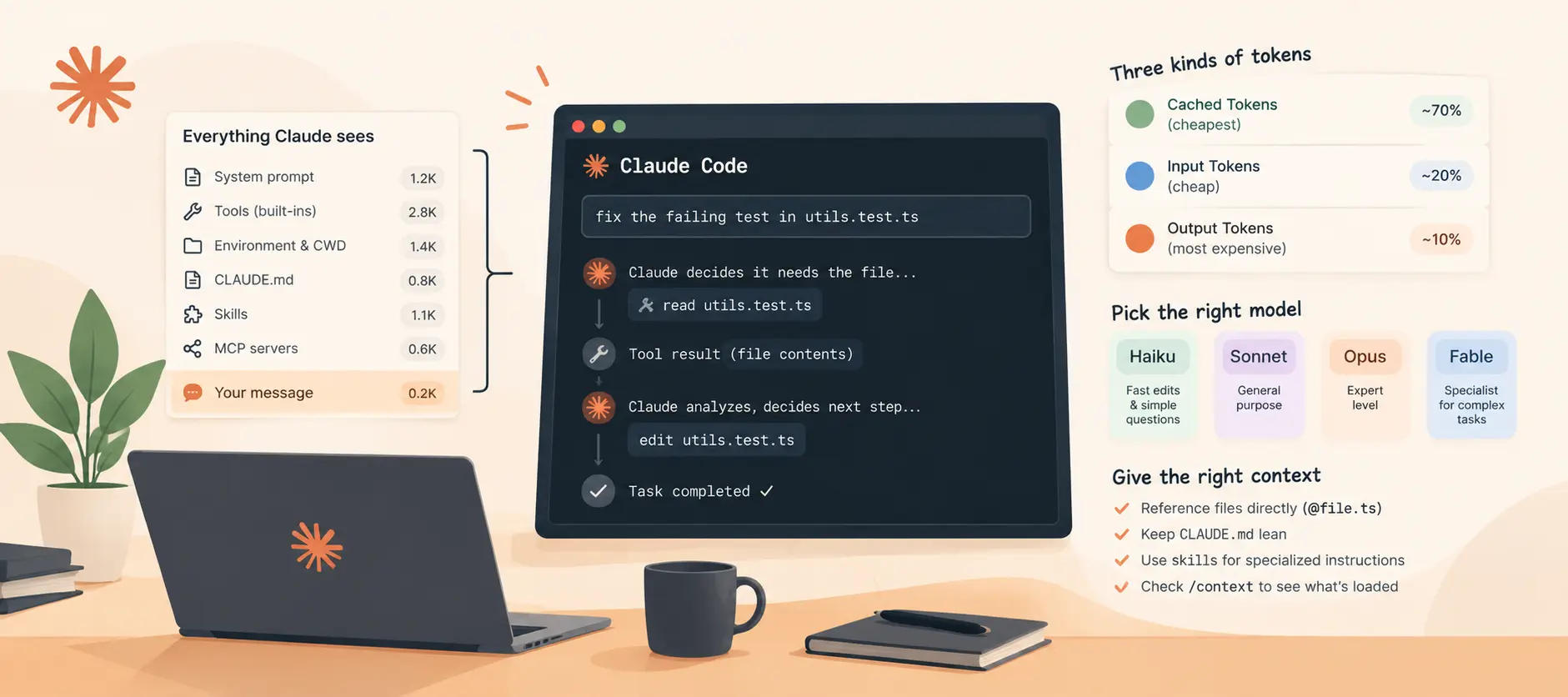
Say you type "fix the failing test in utils.test.ts" and hit enter. Claude Code doesn't send just that sentence to the model.
By the time your session started, it had already loaded Claude's own instructions, the system prompt, definitions for every built-in tool, your environment and working directory, your CLAUDE.md file, your skills, and your MCP server setup. Your message lands at the very end of all of that. The whole bundle goes to the model as one request.
From there, the model reads everything, realizes it doesn't actually have the contents of that file, and sends back a tool call instead of a fix, something like "read utils.test.ts." Claude Code performs that, sends the result back, and the loop continues: the model decides it needs something, calls a tool, gets a result, and keeps going until the task is done. Every round trip adds to what's called the context window: everything the model has seen in this request.
The three kinds of tokens, and why they're priced differently
Everything in that bar breaks down into three types.
Input tokens are everything you send to the model. The model processes these all at once, in a single pass, and GPUs are very good at that, so per token, input is cheap.
Output tokens are everything the model sends back: not just the final summary, but every tool call, every edit, every bit of thinking along the way. These cost more, because the model writes one token at a time. To produce something as simple as const x = 1, it runs a full pass over the entire context just to generate const, another full pass for x, another for =. More compute per token means output is priced the highest of the three.
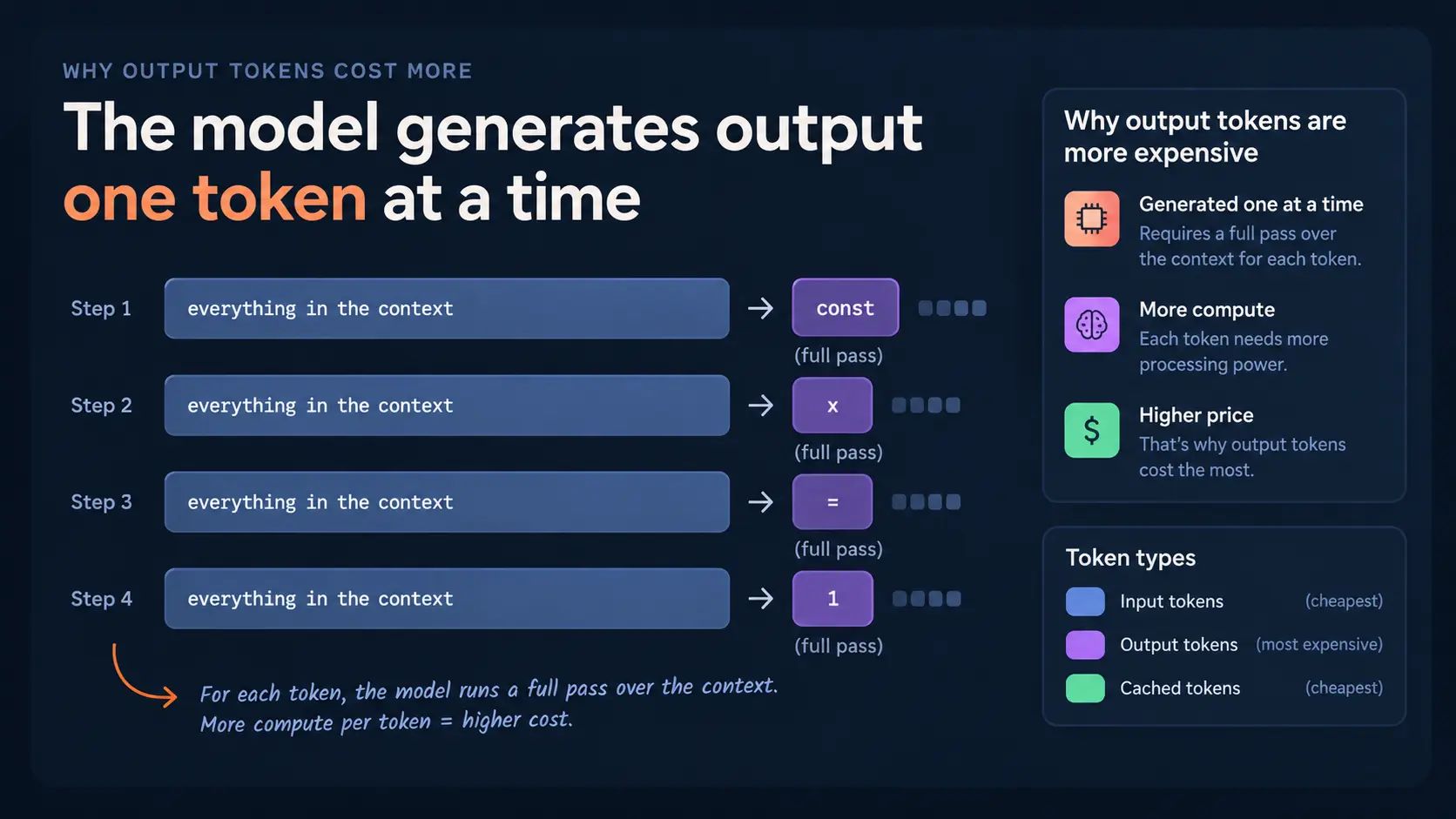
Cached tokens are the cheapest. A big chunk of any request is identical to the one before it, and you're only appending to the end. The server doesn't reprocess that unchanged part; it just reuses the internal state it already built. That unchanged front portion is called the prefix, and it gets billed at a small fraction of normal input price.
In a healthy session, most of your input should be the cheap, cached kind. You can check this yourself: type /usage and look at the prompt cache line. If that number is low, something is breaking your cache.
Pick the right model for the task
The model running your session multiplies everything else, since it applies to every single token, in and out. A bigger model like Opus or Fable does more computation per token, so it costs more, and that's worth it for some tasks, but not all of them.
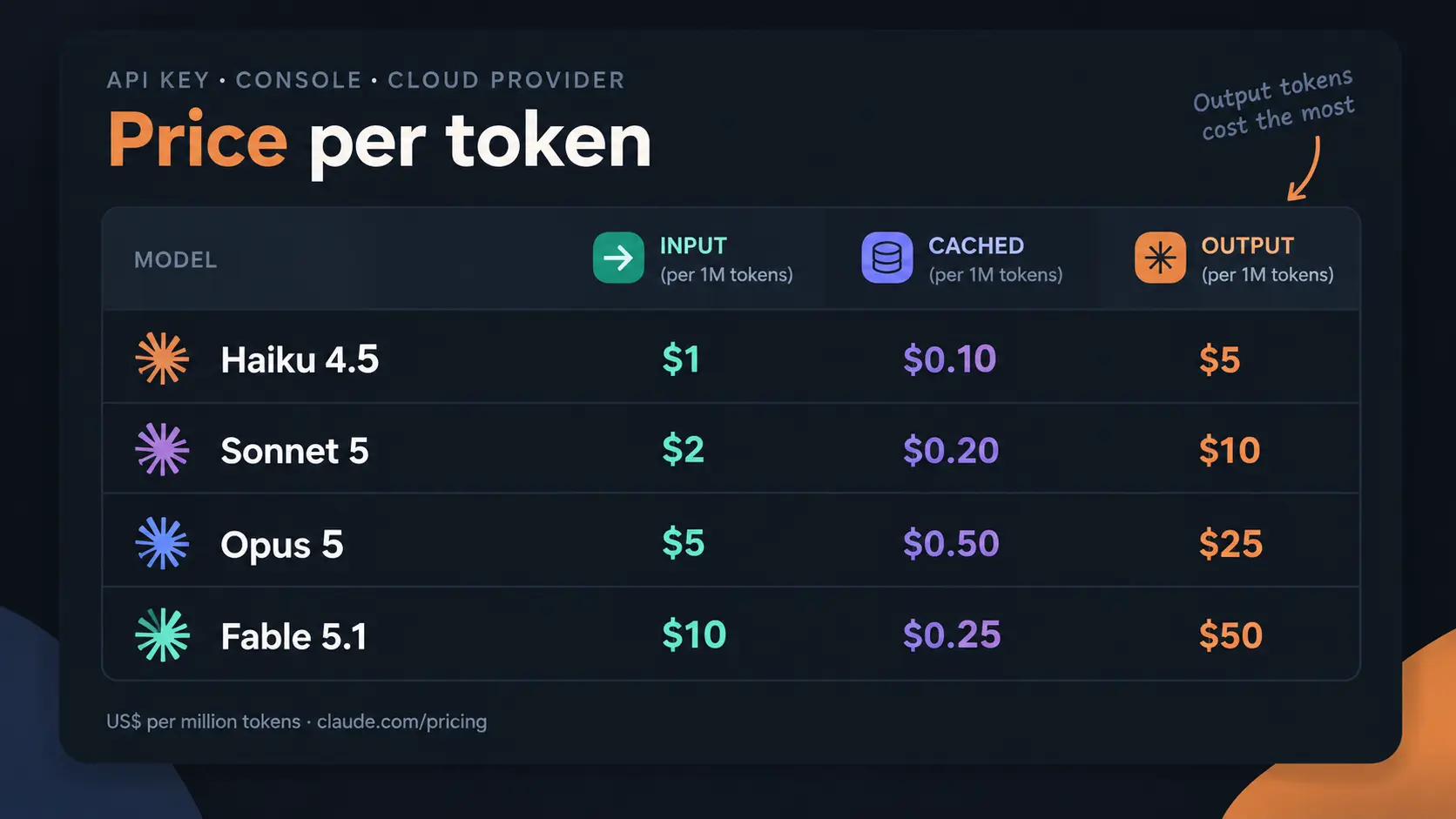
Think of it this way: Sonnet is a strong generalist. Opus is the expert. Fable is the specialist who's seen problems no one else has. Haiku is your quick assistant, great for a precisely described edit, a mechanical change, or a question about code that's already in context.
When a result misses the mark, ask yourself: did it not know enough, or did it not try hard enough? Not knowing enough is a model question. Consider a bigger one. Skipping a file, being lazy, or stopping halfway is an effort question, not a model question.
Give Claude the right context, not more of it
Fewer tool calls and fewer round trips mean Claude spends less time figuring out what you actually want.
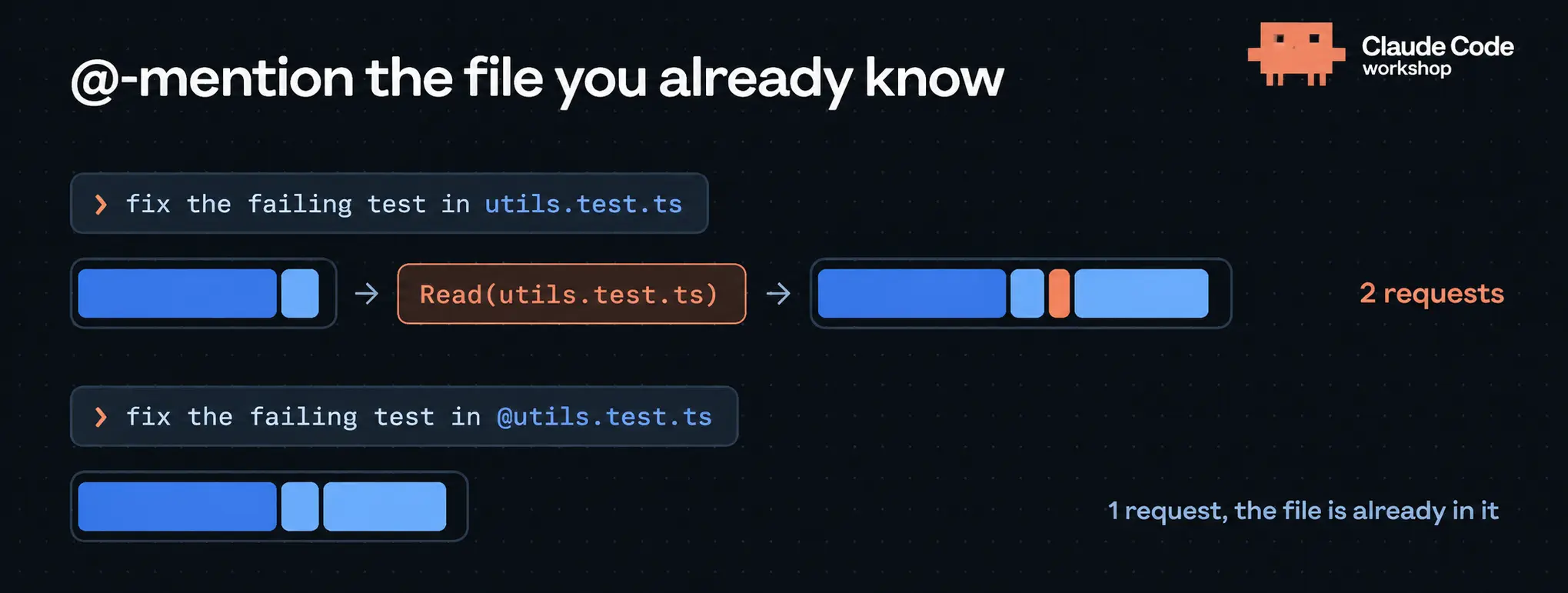
Some of that comes down to your prompt. A small trick: reference the file directly, like "fix the failing tests in @utils.test.ts." Claude Code loads the file's contents into the prompt before the request even goes out, so that first read tool call never has to happen.
The rest comes down to what's already sitting in your context. Type /context in a fresh session and you'll see exactly what's loaded: system prompt, tools, CLAUDE.md, skills, MCPs, with token counts for each. Worth checking before you start anything new.
From there:
- Keep CLAUDE.md lean. Only put things in it that apply to every task. Instructions that only matter for database migrations don't belong there if you're sending them on every single prompt regardless of task. Move them into a skill instead, since skills only load when the model decides it actually needs them.
- Audit old instructions. Guidance you wrote for a model three months ago might not apply anymore. There's a Claude Code prompt-audit skill that reviews your CLAUDE.md and skills against newer models and proposes a diff of what to cut.
- Turn off unused MCP servers. Idle servers are cheap but not free, and their tool definitions still load on demand. Switch off what you're not using this session, or reach for a CLI (GitHub CLI, AWS CLI) instead, which loads nothing upfront.
- Watch command output. Big outputs already get truncated to a file automatically, but anything under that threshold sticks around in full for the rest of the session. A test runner that logs one line per passing test can quietly add hundreds of lines to every request after it. Put your quiet-mode test commands directly in CLAUDE.md so they run the same way every time.
Watch your effort level
Effort tells the model how thorough to be before it calls a task done, and it's a separate lever from the model itself. Higher effort means more output tokens, which cascades into more input tokens on every following turn.
The default is usually fine. It's tempting to bump it to max because you care about getting it right, but that's not always necessary. With larger models like Fable 5.1, medium effort is already excellent, name aside.
Sessions only ever grow until you make them stop
The model never removes anything from context on its own. Everything discussed so far stays in every request for the rest of the session, even once it's no longer relevant. And cache isn't zero-cost. The model still has to process it.
A long session with no resets can use twice the tokens of the same three tasks split into fresh sessions, simply because task two and three keep carrying task one along for the ride.
Your tools here:
/compact: replaces the whole conversation with a summary. You can hint at what to prioritize./rewind: drops the last few turns./clear: starts fresh. Rename the session first if you might want it back later.
Understand what breaks the cache
The server can only reuse the part of a request identical to the previous one, starting from the very first token. The moment one token differs, everything after it is new and gets processed at full price.
That means /compact and /clear both break the cache. You're changing what comes before this point in the conversation, so there's no way around paying full price on the next request. Switching models mid-session does the same thing, since the cache is really that specific model's own internal state; a different model has nothing to reuse. Changing the effort level breaks it too, on every model except Fable 5.1.
Claude Code will warn you before any of these happen while your cache is still warm, so you get a chance to confirm first. Editing files or changing permission mode, on the other hand, never touch your request at all. Those stay entirely on the Claude Code side.
Time matters too
Caches don't last forever. Every request resets the clock, but once you stop sending requests, the prefix expires after a set window: about an hour on a plan, about five minutes on API billing or a cloud provider (subagents always get five minutes, though this is configurable).
The longer window isn't free, either: writing into a one-hour cache costs more than writing into a five-minute one. If you work in steady bursts and rarely pause, the short window is usually cheaper. The long window pays off if you regularly step away and come back to the same session.
Practical takeaway: compact or switch models before you step away, while the cache is still warm, not after you come back. Compacting means the model reads your whole conversation one more time to write the summary, and that read is cheap while cached, full price once the window's expired.
Use subagents to keep the noise out
Sometimes Claude needs to dig through something big (a long log, a whole repo, a full test run) to answer one question, and you only want the conclusion, not the 30 files it read to get there.
That's what a subagent is for. It runs in its own context with its own small system prompt, your CLAUDE.md, and a single task. It does all the reading and tool calls over there, and only the final answer comes back into your main conversation; everything else it read gets dropped.
Subagents aren't free. They have their own input, output, and cache, on that five-minute window. The per-job cost can even run a bit higher. But your main conversation stays small and focused, so every turn after that is cheaper, and your context window doesn't fill up with log files you'll never need again. You can also run a different, cheaper model on a subagent, or set its own effort level.
If you manage Claude Code for a team
Everything above is a personal habit. If you're the one setting Claude Code up org-wide, the same levers exist in managed settings, configured once for everyone:
- Starting model and allowed models: unexpectedly high spend usually traces back to the biggest model being left on as the default.
- Starting effort level: people tend to leave it on highest because they care, but it's rarely necessary. Enterprise plans can also cap the max per model.
- Prompt cache TTL: set the short or long window for your whole team based on how they actually work.
- Allowed MCP servers: so idle ones don't pile up across every install.
- An org-wide CLAUDE.md: shipped to every machine, so every session starts with it.
The admin console's analytics view shows adoption and spend per user and per model. If you turn on OpenTelemetry, you get input, output, cache-read, and cache-write numbers per person too. A high cache-read share means sessions are staying warm; a low one means someone's breaking the cache somewhere. A per-session input line that only ever climbs, never drops, usually means someone's living in one endless session.
On team and enterprise plans, the five-hour and weekly windows are a hard ceiling by default. Usage credits with a spend limit let people keep working past it, and "auto continue at usage limit" picks a long unattended run back up automatically once the window resets.
The three things to remember
- Pick your model, effort level, and MCP servers at the start of a session, then leave them alone. Every one of these sits at the front of your request; changing them mid-session breaks the cache. Fable 5.1 is the one exception that lets you change effort without breaking it.
- Be deliberate about what goes into the conversation. Point Claude at files you already know about, keep command output quiet, and send noisy digging into a subagent so only the summary comes back.
- Keep your session focused. Clear when you start something new. Compact before you step away, while the cache is still warm, not after you come back.
Using Claude Code efficiently was never about using fewer tokens. It's about making sure the ones you do spend go toward the thing you actually asked it to do.
Need a quick definition?
Browse the AI Glossary for plain-English explanations of common terms in this post.
Open AI Glossary →